
Miscommunication with a web agency can cost you weeks of delays and thousands of dollars in revisions. Many small business owners sit through design meetings nodding along, unsure what terms like "responsive design" or "Core Web Vitals" actually mean. That knowledge gap is not your fault, but it is your problem to solve. When you understand the language of web design, you stop accepting vague proposals and start asking the right questions. This guide breaks down the most important web design terms in plain English so you can communicate with confidence, protect your budget, and get a website that actually works for your business.
Table of Contents
- What is web design terminology and why it matters
- Core web design terms every business owner should know
- Responsive vs adaptive design: What's the difference?
- Accessibility and Core Web Vitals: Why they matter for your US business
- A smarter approach: How business owners can cut through web design jargon
- Connect with experts for next-level web design
- Frequently asked questions
Key Takeaways
| Point | Details |
|---|---|
| Know the essentials | Mastering core terms like responsive design, CTA, accessibility, and wireframe enables clear agency communication. |
| Responsive wins in 2026 | Responsive design is critical for mobile users, SEO, and ADA compliance in the U.S. market. |
| Compliance matters | ADA compliance and Core Web Vitals boost your site's performance, safety, and customer reach. |
| Clear terminology, better results | Use precise terms with agencies to avoid delays, misunderstandings, and wasted budget. |
What is web design terminology and why it matters
Web design terminology is the shared vocabulary that designers, developers, and agencies use to describe how a website looks, functions, and performs. Terms like "responsive design," "CTA" (call to action), "accessibility," and "above the fold" are not just technical jargon. They are precise labels for specific decisions that directly affect your business results.
When you and your agency speak the same language, projects move faster and mistakes happen less often. Without that shared vocabulary, you might approve a wireframe thinking it is the final design, or pay for "SEO-optimized" content without knowing what that means for your rankings. Misalignment on even one term can send a project in the wrong direction for weeks.
Here is why this matters beyond just sounding informed in meetings:
- Project timelines: Ambiguous briefs cause revision cycles. Clear terminology cuts them down.
- Budget protection: Knowing what you are paying for prevents agencies from padding invoices with undefined services.
- Performance outcomes: Terms like "Core Web Vitals" connect directly to Google rankings and user experience.
- Legal compliance: Understanding "ADA compliance" protects you from lawsuits that are increasingly common for US businesses.
According to HubSpot's non-designers web design glossary, mastering 20 core terms like responsive, CTA, and accessibility is what allows non-technical business owners to communicate effectively with agencies, with responsive design and Core Web Vitals being the highest priorities for the USA market given ADA compliance requirements and Google's mobile-first indexing.
Pro Tip: Before signing any agency contract, scan their proposal for terms you do not recognize. Write them down and ask for plain-English definitions. An agency that cannot explain their own terms simply is a red flag.
Our web design services are built around transparent communication, and our web design blog regularly breaks down industry concepts in plain language for business owners just like you.
Core web design terms every business owner should know
Let's build your vocabulary fast. These are grouped by function so they are easier to remember and apply.
Layout and structure terms
- Wireframe: A black-and-white sketch showing where elements go on a page. Think of it as the blueprint before construction starts.
- Sitemap: A diagram of all the pages on your site and how they connect. Not a visual design, just the structure.
- Above the fold: Everything visible on screen before a user scrolls. This prime real estate is where your key message and CTA should live.
- Hero image: The large banner image at the top of a homepage. It sets the visual tone of your brand.
- Grid: The invisible column system designers use to align elements consistently across a page.
Content and conversion terms
- CTA (call to action): A button or link that tells users what to do next, like "Book a Free Call" or "Shop Now."
- Landing page: A single-purpose page built for one goal, usually tied to a specific ad or campaign.
- Above the fold CTA: Placing your primary call to action where it is visible without scrolling. This placement typically improves conversion rates.
Usability terms
- Navigation: The menu system users rely on to move through your site. Poor navigation is one of the top reasons visitors leave.
- User experience (UX): How easy and enjoyable your site is to use. Good UX keeps visitors on the page longer.
- Accessibility: Design features that make your site usable for people with disabilities, including screen readers and keyboard navigation.
For a quick comparison of two terms business owners commonly confuse:
| Term | What it means | Business impact |
|---|---|---|
| Responsive design | Site automatically adjusts to any screen size | Works on all devices, boosts SEO |
| Adaptive design | Site serves fixed layouts based on detected device | Faster load on specific devices, less flexible |
The non-designers web design glossary recommends prioritizing responsive design and Core Web Vitals terminology for the USA market, given ADA compliance needs and Google's mobile-first indexing approach.
Knowing these terms also helps you evaluate your SEO services conversations. When an agency mentions "on-page SEO," you will know they are talking about elements like title tags and headings, not just backlinks. Explore all the ways these decisions connect through our business services overview.
Responsive vs adaptive design: What's the difference?
This is the one distinction that confuses nearly every small business owner, and it is important enough to get right before you approve any design proposal.
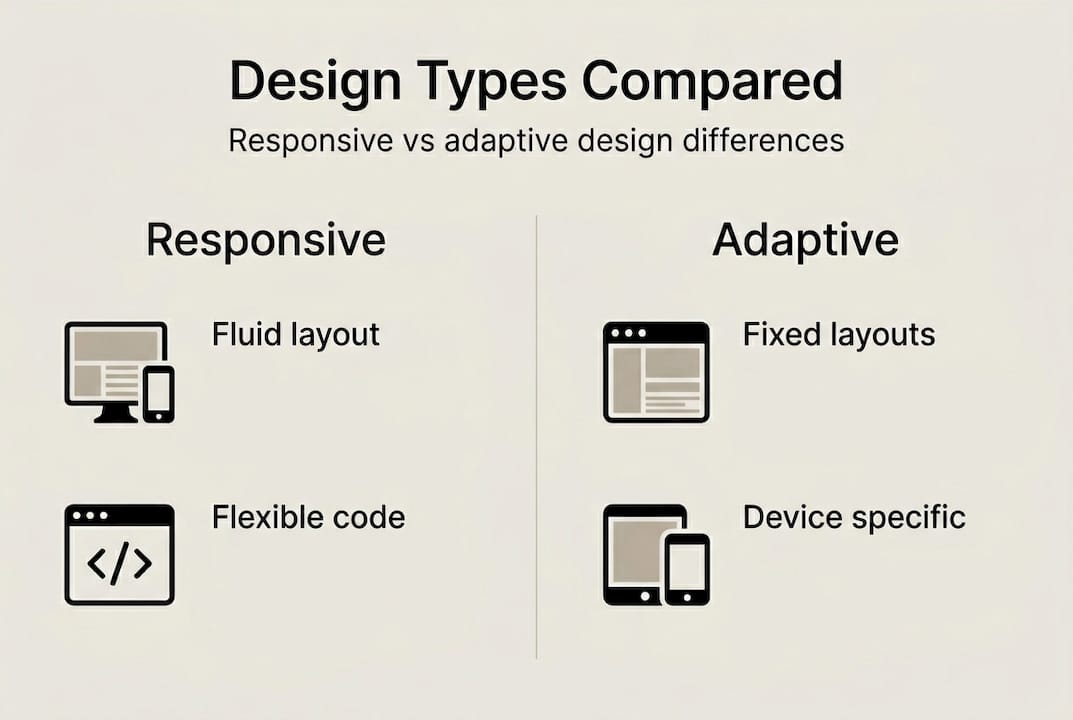
Responsive design means your website fluidly adjusts its layout based on the screen size of whoever is viewing it. It uses CSS tools called Flexbox and Grid, along with media queries (rules that trigger layout changes at specific screen widths) and a viewport meta tag (code that tells mobile browsers how to scale the page). The result: one codebase that looks great on a phone, tablet, and desktop.

Adaptive design takes a different approach. Instead of one fluid layout, it serves completely separate fixed layouts depending on the device detected by the server. So a phone user gets one version of the site, and a desktop user gets another.
| Feature | Responsive | Adaptive |
|---|---|---|
| How it works | Fluid CSS layout | Fixed layouts by device |
| Code maintenance | Single codebase | Multiple layouts to manage |
| Flexibility | High | Low |
| Load speed | Good | Very fast on targeted devices |
| SEO friendliness | Excellent | Moderate |
| Best for | Most small businesses | High-traffic, device-specific apps |
As RWD in 2026 research confirms, responsive design uses CSS Flexbox and Grid with media queries and a viewport meta tag, while adaptive design serves fixed layouts through server-side device detection at specific breakpoints.
For US businesses in 2026, mobile traffic accounts for well over half of all web visits across industries. Google indexes your mobile site first when determining your search ranking. That means a site that is not responsive is actively working against your visibility.
Pro Tip: If your agency proposes adaptive design for a standard small business website, ask why. In most cases, responsive design is more cost-effective, easier to maintain, and better for search rankings.
If you are launching a new brand or expanding into the US market, check out our B2C launch guide and USA market entry resources for direction on which design approach fits your goals.
Accessibility and Core Web Vitals: Why they matter for your US business
These two areas are where web design gets serious legal and financial consequences for small businesses.
Accessibility means designing your website so people with disabilities, including those who are blind, deaf, or have limited motor control, can use it fully. In the US, the Americans with Disabilities Act (ADA) applies to websites, not just physical locations. ADA-related lawsuits against small businesses have increased sharply over the past five years, with thousands of cases filed annually.
"Prioritizing accessibility is not just about avoiding lawsuits. It is about reaching the roughly 26% of US adults who live with some form of disability, which is a customer base most businesses cannot afford to ignore."
Core Web Vitals are Google's set of performance metrics that measure real-world user experience. They include:
- Largest Contentful Paint (LCP): How fast your main content loads. Aim for under 2.5 seconds.
- Interaction to Next Paint (INP): How quickly your site responds when a user clicks or taps.
- Cumulative Layout Shift (CLS): Whether elements jump around as the page loads, which frustrates users and hurts conversions.
Here is a practical checklist to improve both accessibility and Core Web Vitals on your site:
- Add alt text to every image so screen readers can describe them.
- Ensure all colors meet contrast ratio standards (4.5:1 minimum for text).
- Make your site fully navigable by keyboard alone.
- Compress images to improve LCP scores.
- Use stable layout elements to prevent CLS issues.
- Test your site using Google's free PageSpeed Insights tool.
As HubSpot's terminology guide emphasizes, prioritizing responsive design and Core Web Vitals is essential for the USA market given both ADA compliance requirements and Google's mobile-first indexing. Understanding accessibility terminology helps you ask the right questions when reviewing your agency's deliverables.
Investing in professional web design from an agency that builds accessibility into every project protects you legally and opens your site to more customers.
A smarter approach: How business owners can cut through web design jargon
Here is something most web design articles will not tell you: you do not need to memorize every term. Chasing definitions is less useful than understanding what each decision means for your business goals.
The agency owners who get the best results are not the most technically literate. They are the ones who show up with a clear list of priorities. "We need 80% of our traffic to convert on mobile. We need the site to load in under three seconds. We need our booking form above the fold." That kind of clarity forces any agency to perform, no matter what terminology they use.
When you are evaluating a proposal, ask for a demo instead of a description. Ask the agency to show you a responsive design breaking down on a small screen, or walk you through how they measure Core Web Vitals. If they cannot show you, they probably do not fully understand it either.
Our hard-won lesson after working with hundreds of small businesses: the clearest client briefs always produce the best websites. Jargon is often used to fill the gaps where clear thinking should be. Use our business services page to understand exactly what each service delivers before you commit.
Pro Tip: Build a one-page "must-have features" list before your first agency call. Rank features by priority. This single document will save you hours of back-and-forth and thousands in scope creep.
Connect with experts for next-level web design
Now that you have a working vocabulary, putting it into practice is the next step. Understanding the terms is one thing. Having a team that uses them honestly and builds around your business goals is another.
At SourcesNova, we work specifically with small and mid-size businesses that want real growth, not jargon-filled reports. Our professional web design process is built around your goals, your customers, and your market. Whether you are starting from scratch or upgrading an existing site, our B2C launch solutions are designed to get you online and converting faster. Let's build something that actually works.
Frequently asked questions
What are the top 5 web design terms I should know as a small business owner?
The most important are responsive design, CTA, accessibility, Core Web Vitals, and wireframe. These 20 core terms cover the concepts that affect your site's performance, compliance, and conversion rate most directly.
How does responsive design affect my website's ranking and user experience?
Responsive design ensures your site looks and works correctly on any device, which Google rewards with higher rankings through mobile-first indexing. It also reduces bounce rates by giving mobile users a smooth experience.
What is ADA compliance and why is it important for US websites?
ADA compliance means your site is accessible to users with disabilities, meeting federal standards that apply to most US businesses. Ignoring it exposes you to lawsuits, and meeting compliance also expands your potential customer base significantly.
What is the difference between wireframe and sitemap?
A wireframe is a visual layout sketch for a single page showing where elements like buttons and images go. A sitemap is a structural diagram of your entire website showing how all pages connect to each other.
How can I use web design terminology to get better results from my agency?
Use specific terms in your briefs to define what you want, and always ask your agency to explain unfamiliar concepts without jargon. Requesting live examples or demos of any feature they propose will quickly reveal whether their execution matches your expectations.