
A well-optimized Google Business Profile increases local visibility, drives direct customer actions like calls and bookings, and gives you free, measurable marketing tools most small businesses never fully use. The benefits of Google My Business, now officially called Google Business Profile, come down to four outcomes: more people finding you on Search and Maps, more of those people converting into calls or visits, a set of promotional tools that cost nothing, and data that tells you exactly what's working.
Here's what a complete profile actually gets you:
- Higher visibility in the Local Pack and Google Maps
- Stronger local search rankings without paid ads
- Direct customer engagement through reviews, Q&A, and messaging
- Free promotional space for photos, posts, and product listings
- Measurable actions: calls, direction requests, website clicks, bookings
- Built-in trust signals through star ratings and review counts
- Insights data showing exactly how customers find and interact with you
Setting one up takes under an hour. Getting real results from it takes a bit of ongoing attention, which we'll walk through below.
Key Takeaways
A complete, actively managed Google Business Profile drives measurable local visibility, direct customer actions, and free marketing value that most small businesses underuse.
| Point | Details |
|---|---|
| Claim and verify first | An unverified or unclaimed profile can't rank in the Local Pack or accept customer actions. |
| Complete every core field | Accurate categories, services, hours, and photos directly feed local ranking signals. |
| Track Insights monthly | Watch search queries, calls, direction requests, and photo views to gauge real business impact. |
| Manage reviews actively | Responding to reviews builds trust and prevents the neglect that turns customers away. |
| Get expert help when time runs short | Sourcesnova offers profile audits and ongoing management for owners who need the work done for them. |
Table of Contents
- Benefits of Google My Business Small Business Owners Should Prioritize
- How to Claim, Verify, and Optimize Your Profile Today
- Which Insights Metrics Actually Matter
- Mistakes That Quietly Undermine Your Profile
- Using Your Profile to Watch the Competition
- Why Your Profile Matters More on Phones Than on Desktops
- Connecting Your Profile to Google Ads and Analytics
- A Practical Note on Priorities
- Get Your Profile Working Without Doing It All Yourself
- Frequently Asked Questions
- Sources
Benefits of Google My Business Small Business Owners Should Prioritize
Not every benefit carries equal weight. Some move the needle within days; others build slowly over months. Here's how each one plays out in practice.
Increased discoverability on Search and Maps. When someone searches "plumber near me" or "nail salon open now," Google surfaces the Local Pack, that block of three map listings above the organic results. A verified, complete profile is your ticket into that block. Businesses without one simply don't show up there, no matter how good their website is.
Improved local SEO. Google's local ranking algorithm weighs relevance, distance, and prominence. Your Business Profile feeds all three. A profile with accurate categories, complete services, and regular updates signals to Google that your listing deserves to rank. BrightLocal's research notes that a complete, frequently updated profile is often the very first source a potential customer checks when researching a local business, before they ever visit your website.
Customer engagement that actually converts. Reviews, the Q&A section, direct messaging, and booking buttons turn a static listing into a two-way channel. A customer can ask about parking, message you about availability, or book an appointment without ever leaving the search results page.
Free marketing real estate. Google Business Profile is free, and it comes with tools most businesses pay for elsewhere: photo galleries, Posts (short updates that function like mini social media posts), product catalogs, and time-limited offers. A hair salon can post its holiday specials; a hardware store can list seasonal inventory. None of it costs a cent.
Direct conversions. This is the part owners care about most: calls, website clicks, direction requests, and reservations. Google's own guidance confirms that profile presence directly surfaces the kinds of actions that lead to bookings and calls, not just impressions.
Insights and analytics. Every profile comes with a built-in dashboard showing how people found you and what they did next.
Trust and social proof. Star ratings and review volume function as a credibility shortcut. A profile with 40 reviews at 4.7 stars will consistently outperform a competitor with three reviews, even if that competitor's service is just as good.
Operational control. Anyone can suggest edits to your listing. Claiming and managing your profile actively prevents wrong hours, outdated photos, or an incorrect phone number from quietly costing you customers.
Pro Tip: Set a recurring 15 minute block every Monday just for your profile. Check for new reviews, add one photo, and glance at your Insights. That small habit outperforms a one time setup and forget approach almost every time.
How to Claim, Verify, and Optimize Your Profile Today
Getting a profile live and working takes a handful of concrete steps, and none of them require technical skill.
- Claim or find your existing listing. Search your business name on Google. If a listing already exists (Google often creates one automatically), claim it. If not, create one at Google Business Profile.
- Verify ownership. Google typically verifies by postcard mail, phone, email, or instant verification if you've already confirmed the business through Google Search Console. Verification usually resolves within a few days, and changes appear soon after.
- Fill out every core field. Business name (exact legal name, no keyword stuffing), address, phone number, hours, website, and attributes like wheelchair access or outdoor seating.
- Choose your primary category carefully, then add 3 to 5 supporting categories that reflect your actual services.
- Add at least 10 high-quality photos covering your storefront, team, products, and work in progress.
- Enable booking, ordering, or messaging if your business model supports it, and connect any scheduling partner you already use.
Once the basics are live, prioritize in this order: correct categories, complete services list, photos, then attributes. This sequence mirrors what WordStream's feature breakdown identifies as the highest-impact optimization path for getting more calls and bookings.
Maintenance doesn't need to be complicated. Assign one person to check messages and new reviews weekly, and block 20 minutes monthly to add photos, update seasonal hours, and post an offer or update.
Which Insights Metrics Actually Matter
Google Business Profile Insights tracks four categories worth watching: search queries that triggered your listing, total views on Search versus Maps, actions taken (calls, website clicks, direction requests), and photo views compared to competitors in your category.
- Search queries show you the exact terms customers typed. Treat this as free keyword research for your website's service pages.
- A rise in calls usually means more booked appointments, assuming your phone answer rate holds steady.
- A jump in direction requests often precedes a same-day walk-in increase, especially for retail and food service.
- Photo views correlate with how seriously customers weigh your listing against competitors before clicking through.
Google Business Profile's own Insights tool shows precisely how customers found your listing and what they did next, which means you don't have to guess whether your effort is paying off. For a fuller conversion picture, pair GBP Insights with Google Analytics 4 and basic call tracking, so a spike in profile calls can be traced to actual revenue rather than just activity.
Given that Google and Maps listings rank among the platforms consumers trust most when researching local businesses, a dip in your Insights numbers deserves attention fast. Check Insights monthly at minimum, weekly if you're actively running promotions.
Mistakes That Quietly Undermine Your Profile
A handful of avoidable errors account for most underperforming profiles.
- Inconsistent NAP (name, address, phone) across your website, profile, and directories confuses Google's ranking signals.
- Keyword stuffing your business name ("Joe's Plumbing Best Emergency Plumber") violates Google's guidelines and risks suspension.
- Ignoring reviews, especially negative ones, signals neglect to both Google and prospective customers.
- Letting user-suggested edits go unchecked can silently change your hours or address without your knowledge.
Best practice is simple: update photos and posts regularly, respond to every review within a few days, and keep categories and services current as your business evolves. Weekly, check messages and new reviews; monthly, add photos and review your Insights.
Pro Tip: Keep a short template ready for review responses, something like thanking the customer by name and referencing a specific detail they mentioned. It takes thirty seconds and reads far more sincere than a generic copy paste reply.
Using Your Profile to Watch the Competition
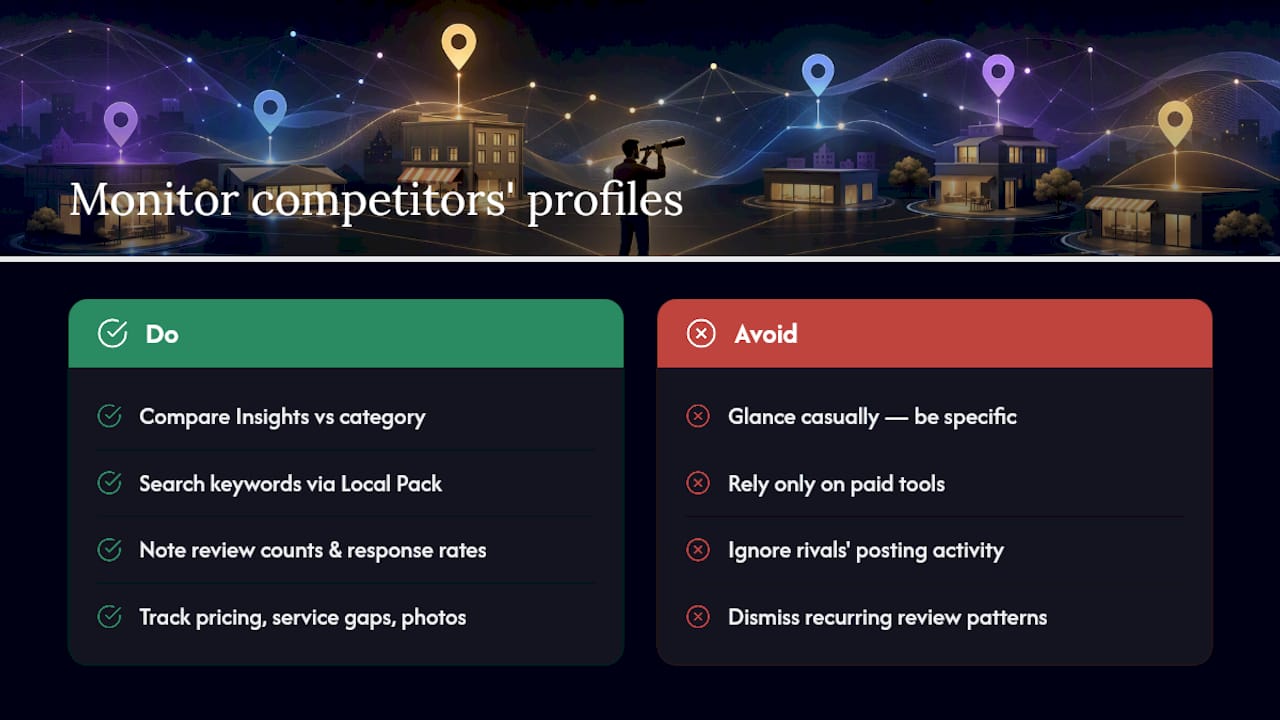
Google Business Profile gives you a quieter form of competitive intelligence than most owners realize. Your Insights dashboard shows how your photo views and profile activity stack up against similar businesses in your category, which tells you whether your visual content is pulling its weight or falling behind.
Beyond Insights, the Local Pack itself is a live competitor scoreboard. Search your own keywords the way a customer would and note who ranks above you. Check their review count, their response rate to negative reviews, the categories they've chosen, and how recently they've posted updates. A competitor who's stopped posting or hasn't responded to a review in six months has left an opening.
Review patterns matter here too. If a rival consistently gets praised for fast response times and you're getting dinged for the same thing, that's a direct signal about where to focus operational fixes, not just marketing copy. Pricing mentioned in reviews, service gaps customers complain about, and even the photos competitors choose to feature all tell you what customers in your market actually care about.
None of this requires paid tools. It requires treating your competitors' public profiles the way you'd study a rival's storefront: regularly, and with specific questions in mind rather than a general glance.
Why Your Profile Matters More on Phones Than on Desktops
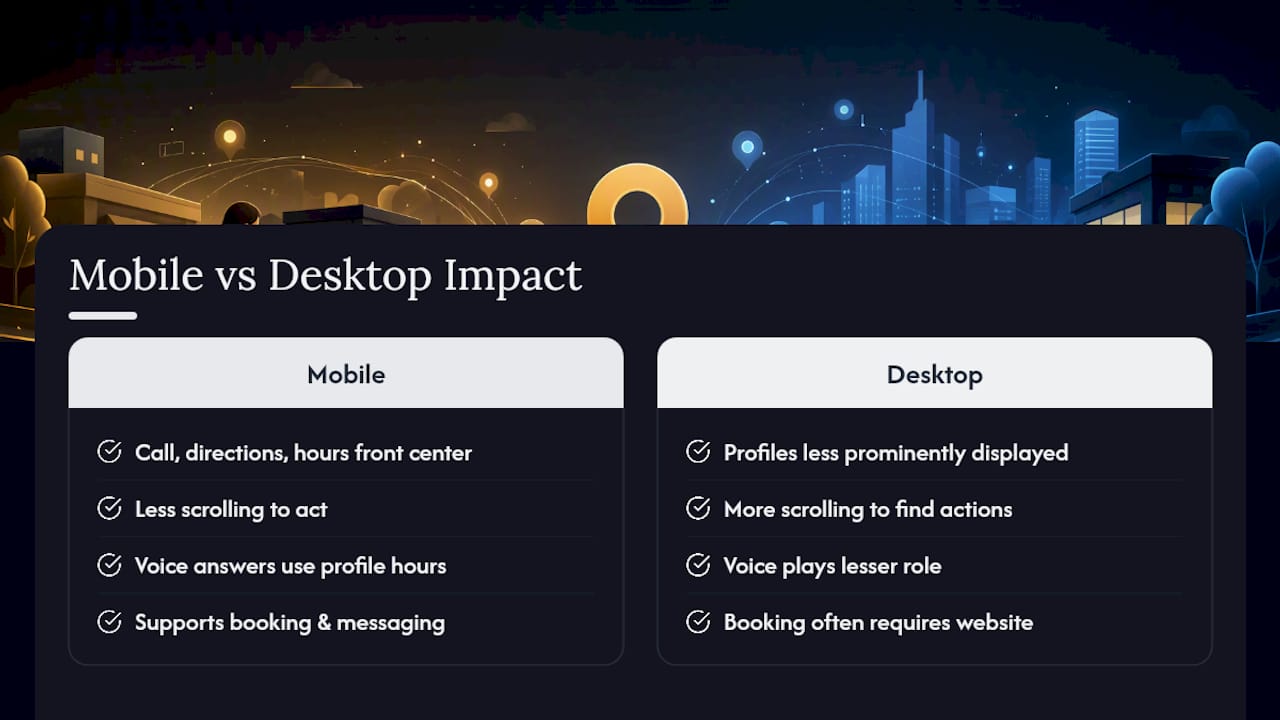
Most local searches happen on a phone, often while someone is already close by and ready to act. Google Business Profile is built around that behavior. The mobile Search and Maps interface puts your call button, direction request, and hours front and center, with far less scrolling than a desktop site requires.
Voice search compounds this. When someone asks a smart speaker or their phone "what's the closest bakery open right now," the assistant pulls directly from Business Profile data, meaning your accurate hours field isn't just a formality; it's the difference between showing up in that answer or not. Voice queries also skew toward natural, conversational phrasing ("where can I get my dog groomed near me"), which rewards businesses with fully filled-out services and categories rather than a bare-bones listing.
This is also where booking and messaging features earn their keep. A mobile user rarely wants to navigate to a full website to find a phone number. One tap should get them talking to you or booking directly. Businesses that enable these mobile-first actions consistently see a shorter path between search and conversion. If your website isn't built to match that speed on mobile, the gap between your profile's promise and your site's follow-through becomes obvious fast, and it's worth reviewing your broader local SEO setup alongside your profile.
Connecting Your Profile to Google Ads and Analytics
A Business Profile doesn't operate in isolation. Linking it to Google Ads lets you run location extensions that pull your address, phone number, and ratings directly into search ads, which tends to lift click-through rates because searchers see proof of a real, rated business before they even click.
Google Analytics 4 closes the loop on the other end. While GBP Insights tells you someone clicked "call" or "directions," GA4 tracks what happens after someone lands on your website from that profile, whether they browsed your services page, abandoned a booking form, or converted. Combining the two data sets turns a vague sense of "the profile seems to be working" into an actual accounting of leads and revenue.
For businesses running paid social campaigns alongside their profile, the same principle applies: profile data validates ad spend by showing whether the leads an ad platform reports are turning into the calls and direction requests your Insights dashboard tracks independently. Businesses expanding into markets where they lack a physical storefront yet, particularly wholesale or B2B sellers building local listings as a discovery channel, often underuse this integration entirely, treating GBP and paid channels as separate efforts instead of one connected system.
A Practical Note on Priorities
Most owners overcomplicate this. Skip the perfectionism and do five things in order: claim and verify, lock in accurate categories and services, get your first 10 reviews, add real photos, and turn on booking if it applies to you. Everything else is refinement.
Get Your Profile Working Without Doing It All Yourself
If reading through claim, verify, categorize, photograph, and monitor made your Monday feel longer already, you're not the only owner who'd rather hand this off. Sourcesnova runs Business Profile audits, full setup and verification, and ongoing monthly management, so your listing gets the same weekly attention this article recommends without it landing on your plate.
Owners who hire this out typically get a completed audit and optimized profile within the first couple of weeks, followed by monthly reporting on calls, direction requests, and review growth, the same metrics covered above, delivered without you needing to log into Insights yourself; for example, Alternative Car Care's expert auto repair services demonstrate how a well-optimized profile highlights service specialties effectively. It fits businesses juggling day-to-day operations who know their profile matters but haven't had the hours to manage it properly. If your reviews have gone unanswered for months or your categories haven't been touched since setup, that's usually the clearest sign it's time for a second set of eyes. Get a Google Business Profile audit from Sourcesnova and see exactly what's costing you calls right now.
Frequently Asked Questions
What are the main benefits of Google My Business for a small business? The core benefits are increased visibility in Google Search and Maps, direct customer actions like calls and bookings, free promotional tools, and built-in analytics showing how customers find and interact with your listing.
Is Google My Business still called that in 2026? No. Google rebranded it to Google Business Profile several years ago, though many business owners still search using the old name out of habit.
How does Google My Business work for ranking in local search? Google's local algorithm weighs relevance, distance, and prominence, and a complete, active profile with accurate categories and regular updates strengthens all three signals.
How long does it take to see results after setting up a profile? Basic visibility often improves within days of verification, but meaningful ranking gains and review growth typically build over one to three months of consistent updates.
Can Google My Business help with voice search? Yes. Voice assistants pull directly from Business Profile data for queries like "near me" searches, making accurate hours and complete service listings essential for showing up in spoken answers.
Sources
- Google Business Profile — Get listed on Google
- 10 Google Business Profile features to help your listing stand out - WordStream