
Listing products online is the process of preparing, creating, and optimizing product entries on digital sales channels to attract buyers and increase conversions. Done right, it is the single most controllable factor in your e-commerce revenue. A great product will not sell itself. Strong keyword targeting and optimized listings are what put your products in front of buyers who are ready to purchase. This guide covers every step, from the tools you need before you start to the ongoing work that keeps listings competitive.
How to list products online: what you need before you start
Preparation determines whether your listings go live smoothly or get rejected. Three categories of preparation matter most: product identifiers, visual assets, and data management tools.
Product identifiers are non-negotiable on major marketplaces. Amazon, Walmart Marketplace, and similar platforms require unique product IDs like GTIN, UPC, or a GS1 company prefix number to accept any new listing. These identifiers tie your product to a global catalog. Without them, your listing either fails to publish or gets flagged for review.
Visual assets carry more weight than most sellers expect. Product images are often the first thing a buyer evaluates. Use a white or neutral background, shoot from multiple angles, and include at least one lifestyle image showing the product in use. For physical goods, a reliable product checklist that covers image specs, dimensions, and material details prevents costly revisions after upload.

Data management becomes critical once you sell across more than one channel. A Product Information Management system, commonly called a PIM, centralizes your product data so updates push to every platform at once. Without a PIM, sellers often end up with mismatched prices, outdated descriptions, and inventory errors across channels.
Here is a pre-listing checklist to work through before uploading anything:
- GTIN, UPC, or GS1 prefix confirmed and verified
- Product images meeting each platform's size and format requirements
- Category mapping completed to the most specific sub-category available
- Product title, description, and bullet points written and reviewed
- Inventory quantities confirmed and synced with your fulfillment system
- Pricing set with platform fees factored in
Pro Tip: Verify your barcodes against the GS1 database before submitting. Barcode rejections are one of the leading causes of listing delays on major marketplaces, and fixing them after submission costs more time than preventing them upfront.
| Preparation Area | What to Complete |
|---|---|
| Product identifiers | Obtain GTIN or UPC from GS1 before listing |
| Product images | Shoot on white background, minimum 1,000 pixels on the longest side |
| Category mapping | Select the most specific sub-category, not a broad parent |
| Product data | Write title, description, and bullet points before uploading |
| Inventory system | Confirm stock counts and connect to your fulfillment workflow |
How do you write product titles and descriptions that convert?
The title formula that consistently outperforms generic alternatives is: Brand + Main Keyword + Key Feature + Variant. For example, "Acme Running Shoes Lightweight Mesh Men's Size 10 Gray" beats "Men's Shoes" in both search ranking and click rate. Platform character limits vary: Amazon allows roughly 200 characters, eBay caps titles at 80, and Etsy allows 140. Knowing these limits before you write prevents truncation that cuts off key details.
Descriptions work best when they answer four buyer questions directly: what the product is, who it is for, what problem it solves, and why it is better than alternatives. Descriptions between 150 and 300 words perform best for mobile shoppers and improve conversion rates. That length is enough to cover the essentials without losing a reader who is scanning on a phone.
Structure your description with a short opening paragraph followed by bullet points. The opening sets context and tone. The bullets answer specific questions fast. Packaging details, material specs, and compatibility notes belong in the bullets, not buried in a paragraph. For physical goods, including accurate packaging information in your listing builds buyer confidence and reduces return rates.
Keyword placement follows a clear rule: use one main keyword plus 2 to 4 secondary keywords, woven naturally into the title and description. Keyword stuffing lowers your ranking on most platforms and reads as spam to buyers. Write for the buyer first, then check that your keywords appear naturally.
Pro Tip: Read your description out loud before publishing. If it sounds like a list of search terms rather than a product explanation, rewrite it. Buyers and platform algorithms both penalize unnatural keyword density.
What are the steps to list products on e-commerce platforms?
The general workflow for listing products on any major marketplace follows the same sequence, regardless of platform.
- Connect your seller account. Complete platform verification, tax information, and payment setup before attempting to list. Incomplete accounts cause listing holds.
- Map your categories. Select the most specific sub-category available. Broad parent categories reduce discoverability and can delay approval. A product listed under "Electronics" instead of "Wireless Earbuds" competes against thousands of unrelated items.
- Upload your product data. For small catalogs, manual entry works. For catalogs above 20 products, use a bulk upload template. Most platforms provide a CSV or spreadsheet template with required and optional fields clearly labeled.
- Complete the auto-link process. Automated listing tools require an auto-link step that maps your catalog products to existing marketplace offers. Filtering products before auto-linking is a common mistake that shows zero results and makes sellers think the tool is broken. Always complete auto-linking first.
- Review and publish. Check each listing for missing fields, image errors, and pricing accuracy. Submit for platform review where required.
- Sync inventory. Connect your inventory system so stock levels update automatically. Manual inventory management across multiple channels leads to overselling and account penalties.
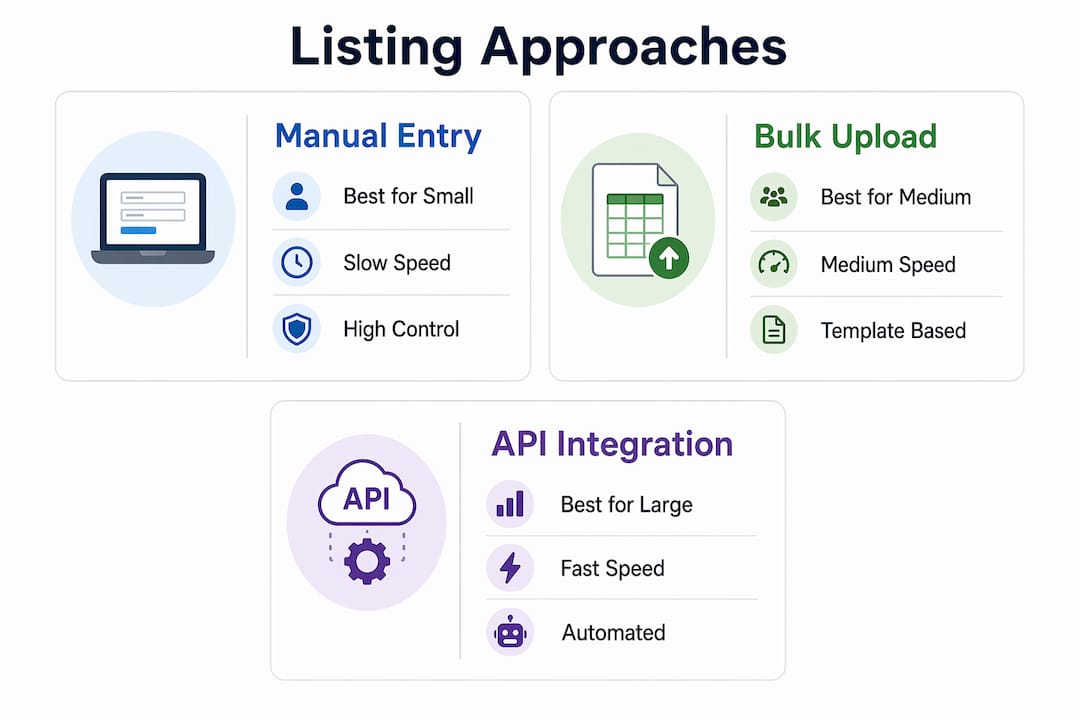
The table below compares three common listing approaches by effort, speed, and suitability.
| Approach | Best for | Speed | Main risk |
|---|---|---|---|
| Manual entry | Catalogs under 20 products | Slow | Human error at scale |
| Bulk CSV upload | Mid-size catalogs, 20–500 products | Medium | Template formatting errors |
| PIM automation | Large or multi-channel catalogs | Fast | Requires setup investment |
Pro Tip: Set a recurring calendar reminder to audit your listings every 30 days. Platforms update their category structures and content requirements regularly. A listing that was compliant in january may be flagged by march.
What mistakes do sellers make when listing products online?
The most common listing errors are preventable. Recognizing them before they happen saves time and protects your seller account standing.
- Generic titles. Titles like "Blue Shirt" or "Phone Case" contain no differentiating information. They rank poorly and give buyers no reason to click.
- Wrong category selection. Choosing a broad or incorrect category is one of the top reasons products fail to appear in search results. Category mapping to specific sub-categories is critical for discoverability.
- Skipping keyword research. Listing without researching what buyers actually search for means your product competes on price alone. Use platform search suggestions and tools like Google Keyword Planner to identify real search terms.
- Unverified barcodes. Submitting a barcode that does not match the GS1 database triggers automatic rejection on Amazon and Walmart. Always verify before submitting.
- Duplicate listings. Creating multiple listings for the same product confuses the platform algorithm and splits your review count. Consolidate variants under a single parent listing using the platform's variation feature.
- Ignoring mobile formatting. More than half of online shopping happens on mobile devices. Long paragraphs without bullet points lose mobile buyers within seconds.
Accurate category mapping aligned with GS1 standards reduces listing errors and improves product discovery across marketplaces.
Pro Tip: Search for your own product on the platform after publishing. If you cannot find it within the first two pages using your target keyword, your title or category needs revision.
How do you maintain and optimize listings after publishing?
Publishing a listing is the start of the work, not the end. Listings that stay competitive require regular attention across four areas.
- Pricing and inventory. Review pricing weekly against current market rates. Platforms like Amazon use dynamic pricing signals, and a listing priced significantly above the market average loses the Buy Box. Keep inventory counts accurate to avoid stockouts that drop your ranking.
- Keyword refreshes. Search behavior shifts with seasons, trends, and platform algorithm updates. Revisit your keyword strategy quarterly. Replace underperforming terms with new ones based on current search volume data.
- Description updates. Add new product details, address common questions from customer reviews, and update compatibility information as your product line evolves. A description written two years ago rarely reflects current buyer expectations.
- Email marketing integration. Email marketing drives traffic to your listings independent of platform algorithms. Salesforce identifies email as one of the most valuable assets for independent sellers because it reaches buyers you already own, without paying for ads.
- Analytics review. Most platforms provide listing performance data including impressions, click rate, and conversion rate. An impression count with a low click rate signals a title problem. A high click rate with low conversions signals a description or pricing problem. Fix the right variable.
Listing products should be part of a broader sales strategy that includes marketing and CRM activities. Sellers who treat listings as static assets consistently underperform against those who treat them as living content.
Key Takeaways
Effective product listing combines accurate preparation, keyword-focused content, and consistent post-publish optimization to drive visibility and sales across every marketplace.
| Point | Details |
|---|---|
| Prepare before uploading | Verify GTINs, complete images, and map to specific sub-categories before submitting any listing. |
| Use the title formula | Brand + Main Keyword + Key Feature + Variant outperforms generic titles in both search rank and click rate. |
| Complete auto-linking first | In automated tools, auto-link your catalog before filtering products or you will see zero eligible results. |
| Avoid the top mistakes | Generic titles, wrong categories, and unverified barcodes are the three most common causes of listing failure. |
| Treat listings as living content | Refresh keywords, update descriptions quarterly, and use email marketing to drive traffic outside platform algorithms. |
Why listing structure matters more than most sellers realize
Working with small business owners across retail and e-commerce, the pattern is consistent: sellers invest heavily in sourcing a great product, then spend almost nothing on the listing itself. They write a two-sentence description, pick the first category that looks right, and wonder why sales are flat.
The uncomfortable truth is that a listing is a sales page. It does the same job a salesperson does in a physical store. It answers questions, builds confidence, and removes objections. A listing that does not do those things does not convert, regardless of how good the product is.
The detail that surprises most sellers is how much category mapping affects discoverability. Choosing a parent category instead of the correct sub-category does not just reduce visibility. It actively places your product in a pool of thousands of unrelated items where no buyer is looking for what you sell. Fixing this one mistake alone has moved products from page 10 to page 1 in marketplace search results.
The other underestimated factor is the ongoing work. Most sellers treat listing as a one-time task. The sellers who consistently grow their revenue treat it as a monthly discipline. They check analytics, update keywords, and respond to what the data tells them. That habit compounds over time in ways that a single well-written listing never can.
— Tran
Sourcesnova helps you list, manage, and grow online
Getting your products listed correctly across multiple channels takes time, technical knowledge, and consistent follow-through. Sourcesnova works with small and mid-size businesses to handle exactly that.

Sourcesnova builds and manages e-commerce product listings with a focus on marketplace compliance, keyword accuracy, and conversion-focused content. The team handles category mapping, bulk uploads, and ongoing listing optimization so business owners can focus on running their business. No bloated retainers and no vanity reports. Just clear execution that puts your products in front of buyers who are ready to purchase. Contact Sourcesnova to get a straightforward assessment of where your listings stand and what it takes to improve them.
FAQ
What does it mean to list a product online?
Listing a product online means creating an optimized entry on a marketplace or e-commerce platform that includes a title, description, images, price, and product identifiers. The goal is to make the product findable and persuasive to buyers.
What product identifiers do I need to list on major marketplaces?
Most major marketplaces require a GTIN, UPC, or GS1 company prefix number to accept a new product listing. Submitting an unverified barcode is one of the leading causes of listing rejection on platforms like Amazon and Walmart Marketplace.
How long should a product description be?
Product descriptions between 150 and 300 words perform best for mobile shoppers and improve conversion rates. Use a short opening paragraph followed by bullet points that answer the buyer's key questions directly.
How often should I update my product listings?
Review pricing and inventory weekly, and refresh keywords and descriptions at least quarterly. Platform algorithms and buyer search behavior both shift over time, and listings that are not updated gradually lose ranking.
How much can sellers realistically earn from optimized listings?
Profitable Amazon sellers earn between $1,000 and $25,000 monthly with net margins around 15–20%. Results depend directly on listing quality, keyword accuracy, and consistent execution.