
An online ads setup workflow is an organized, repeatable process that takes a campaign from account configuration to live launch without skipping critical steps. Small business owners and marketing managers who follow a documented workflow see fewer launch errors, better budget efficiency, and more consistent results. The digital advertising process breaks down into four phases: preparation, execution, monitoring, and troubleshooting. Each phase has defined entry and exit criteria that prevent wasted spend before it happens. Getting this right from the start is the difference between a campaign that learns and scales and one that stalls on day one.
What does a solid online ads setup workflow require before launch?
Every effective ad campaign management process starts with the right accounts, assets, and tracking in place before a single dollar is spent. Skipping this preparation phase is the fastest way to launch a campaign that cannot be measured or improved.
Accounts and tracking infrastructure
Connect your business accounts and install tracking before building any campaign. For Meta advertising, this means a verified Business Manager, a linked ad account, and a Meta Pixel firing correctly on your website. For Google, you need Google Ads linked to Google Analytics 4 with conversion tracking confirmed. Pixels and UTM parameters are not optional extras. They are the foundation for every data-driven decision you will make after launch.

Pro Tip: Test your pixel with Meta's Pixel Helper browser extension or Google Tag Assistant before building any campaign. A broken pixel means your campaign will optimize toward nothing.
Asset library and naming conventions
Organize your creative assets into a structured library before you start building ad sets. This means folders sorted by format (static image, video, carousel), by audience type, and by campaign objective. Scalable advertising teams document naming conventions, audience segments, and creative protocols to build reusable templates. That discipline pays off when you need to launch a second or third campaign quickly without rebuilding from scratch.
Prerequisites overview
| Asset or Tool | Purpose | Status Check |
|---|---|---|
| Meta Business Manager | Ad account and page access | Verified and linked |
| Meta Pixel or Conversions API | Conversion tracking | Firing on key pages |
| Google Analytics 4 | Website behavior data | Connected and collecting |
| UTM parameters | Source attribution | Applied to all ad URLs |
| Creative asset library | Ready-to-use images and videos | Organized by format and audience |
| Campaign templates | Reusable campaign structures | Built and saved |
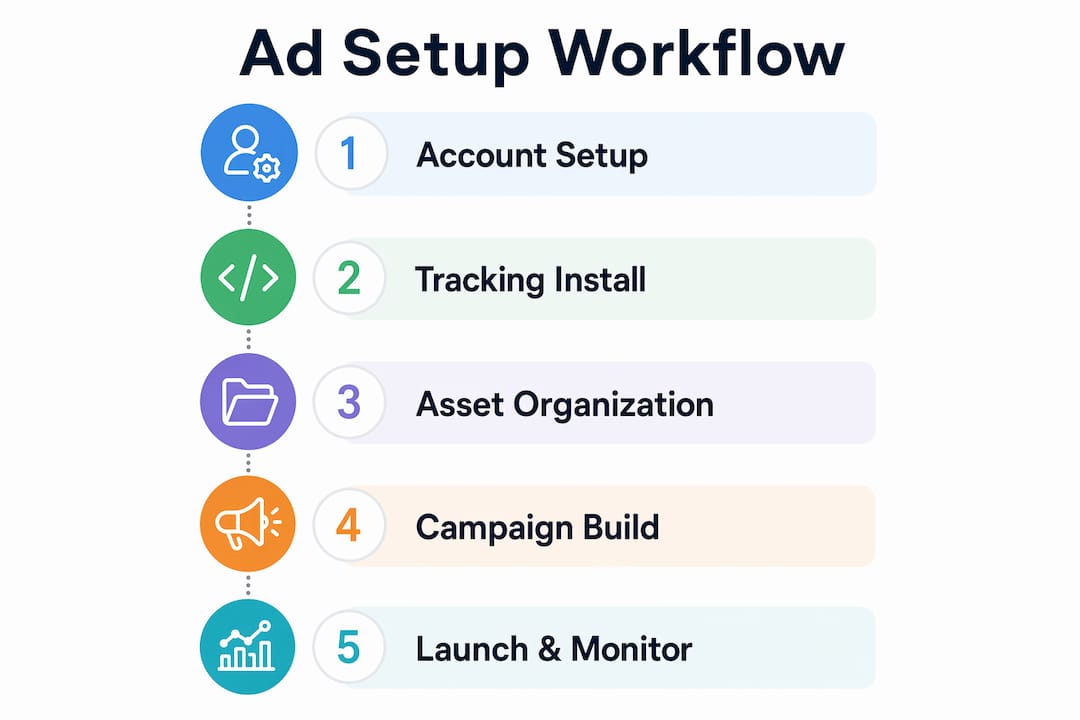
How do you execute the online ads setup workflow step by step?
The phase-gate approach divides campaign setup into six stages, each with clear entry and exit criteria. A phase-gate system prevents campaign stalls and improves success rates by stopping teams from advancing before prerequisites are met.
-
Account hygiene. Audit your ad account before building anything. Remove duplicate audiences, archive old campaigns, and confirm billing is current. A cluttered account creates confusion and slows down reporting.
-
Competitive research. Study what your competitors are running. Use Meta's Ad Library to review active ads in your category. Note which formats, offers, and calls to action appear most frequently. This research informs your creative brief and audience targeting.
-
Campaign objective selection. Choose the objective that matches your actual business goal. Awareness campaigns optimize for reach. Traffic campaigns optimize for clicks. Conversion campaigns optimize for purchases or leads. Selecting the wrong objective is one of the most common and costly mistakes in the digital advertising process.
-
Audience targeting and placement. Define your primary audience using demographic data, interest targeting, or custom audiences built from your pixel data. Set placements to automatic for most small business campaigns. Manual placement selection requires enough data to justify the restriction.
-
Budget and bid settings. Set a daily budget rather than a lifetime budget for any campaign you plan to scale. Daily budgets set at 3–5x your target CPA give the algorithm enough room to find conversions without burning through your spend in the first 48 hours.
-
Ad creative and copy build. Write your headline, primary text, and call to action before uploading assets. Test one variable at a time. If you change the image, keep the copy identical across variants. Structured testing with one variable at a time enables objective creative assessment and removes guesswork from performance analysis.
-
Pre-launch checklist review. Run an eight-point pre-launch check before publishing. Confirm pixel is firing, UTMs are applied, the correct objective is selected, the audience size is sufficient, the budget is set correctly, creative assets meet platform specs, the landing page loads correctly, and a second reviewer has signed off.
-
Campaign launch and learning phase entry. Publish the campaign and monitor the learning phase closely. Meta requires 50 optimization events within the learning phase for the algorithm to perform at its best. Do not make major edits during this period.
Avoid making budget changes greater than 20% during the learning phase. Any change above that threshold resets the learning phase clock and forces the algorithm to start over, wasting the data it has already collected.
Pro Tip: Use bulk upload via structured spreadsheets for campaigns with multiple ad sets. Bulk upload reduces manual errors and creates an automatic audit trail you can reference if something breaks.
How do you monitor and scale campaigns after setup?
Post-launch management is where most small business campaigns either grow or stall. The goal is to make decisions based on data, not instinct, and to change only one thing at a time.
Track these key performance indicators from day one:
- Cost per result (CPR). The average cost to achieve your campaign objective. Rising CPR signals audience fatigue or creative exhaustion.
- Cost per acquisition (CPA). The cost to acquire one customer or lead. Compare this against your target CPA to assess profitability. Marketing metrics like CPA and ROAS tell you whether a campaign is worth scaling or cutting.
- Return on ad spend (ROAS). Revenue generated per dollar spent. A ROAS below 1.0 means you are losing money on every sale.
- Frequency. How many times the average person in your audience has seen your ad. Frequency above 3.0 often signals creative fatigue and declining performance.
Optimization best practices after the learning phase ends:
- Reallocate budget toward the top-performing ad sets, not the top-performing individual ads. Ad set level data is more statistically reliable.
- Rotate creative every 3–4 weeks or when frequency exceeds 3.0, whichever comes first.
- Apply decision rules before making any change. Define the minimum data threshold (impressions, clicks, or conversions) required before pausing an ad.
- Scale budgets gradually. Increase daily budgets by no more than 20% every 48–72 hours to avoid triggering a new learning phase.
- Build a digital marketing workflow that schedules weekly performance reviews at a fixed time, so optimization decisions are deliberate rather than reactive.
What are the most common mistakes in the ad setup process?
The most frequent errors in the workflow for ad creation fall into three categories: tracking failures, learning phase disruptions, and skipping phase gates.
Common mistakes to avoid:
- Launching without confirmed tracking. A campaign with a broken pixel or missing UTMs cannot be optimized. Every conversion is invisible to the algorithm.
- Making large budget changes mid-flight. Increasing or decreasing a budget by more than 20% resets the learning phase. This is the single most common reason campaigns stall after an initial period of good performance.
- Skipping the pre-launch checklist. Skipping phase gates is the most common cause of campaign stalls. A documented checklist with reviewer sign-off prevents the majority of launch errors.
- Testing too many variables at once. Changing the image, copy, and audience simultaneously makes it impossible to know what drove a result.
- Pausing campaigns too early. Pausing a campaign before it exits the learning phase wastes the optimization data already collected and forces a restart.
Pro Tip: Create a pre-launch checklist as a shared document your team reviews before every campaign goes live. Treat it like a flight checklist. No campaign publishes without every box checked.
Pro Tip: If a campaign is underperforming, check frequency and audience overlap before changing creative or budget. Overlapping audiences cause your ads to compete against themselves, inflating costs without improving reach.
Key Takeaways
A well-built online ads setup workflow prevents the three most expensive mistakes in digital advertising: broken tracking, learning phase resets, and skipped pre-launch checks.
| Point | Details |
|---|---|
| Set up tracking first | Install and verify your pixel and UTM parameters before building any campaign. |
| Use a phase-gate approach | Advance through each campaign phase only after defined entry and exit criteria are met. |
| Protect the learning phase | Avoid budget changes above 20% until the algorithm collects 50 optimization events. |
| Test one variable at a time | Isolate image, copy, or audience changes to get reliable performance data. |
| Schedule weekly reviews | Make optimization decisions at fixed intervals using data thresholds, not gut reactions. |
What I have learned building ad workflows for small businesses
Working with small business owners across retail, beauty, and service industries, I have seen the same pattern repeat. The businesses that get consistent results from paid ads are not the ones with the biggest budgets. They are the ones with the most disciplined processes.
The phase-gate framework changed how I approach every campaign build. Before adopting it, I would launch campaigns with incomplete tracking or skip the competitive research step when a client was in a hurry. Those shortcuts always cost more time later. A stalled campaign in week two is far more expensive than a careful setup in week one.
The lesson I keep coming back to is this: repeatable ad systems outperform one-off campaigns every time. When you document your naming conventions, save your audience segments, and build reusable templates, you are not just saving time. You are building institutional knowledge that compounds over every campaign you run.
Creative refresh timing is the area where I see the most avoidable waste. Most small business owners wait until performance collapses before changing creative. The right trigger is frequency, not results. When frequency hits 3.0, start rotating new creative in, even if the numbers still look acceptable. Waiting for the drop means you are already behind.
— Tran
How Sourcesnova helps you build campaigns that actually work
Running paid ads without a clear process costs small businesses real money every month. Sourcesnova works with local and small-to-mid-size businesses to build the kind of structured ad campaigns that perform consistently, not just at launch.
Sourcesnova handles campaign setup, pixel installation, UTM configuration, creative asset organization, and ongoing performance management. The team builds reusable templates and audience libraries so your second campaign launches faster and smarter than your first. If you are ready to run paid ad campaigns with a process behind them, Sourcesnova is built for exactly that. No jargon, no vanity reports. Just clear execution and measurable results for your business.
FAQ
What is an online ads setup workflow?
An online ads setup workflow is a documented, repeatable process that organizes every step of campaign creation, from account setup and tracking installation to launch and post-launch optimization. It prevents errors by requiring defined checks at each phase before advancing.
How many optimization events does Meta need in the learning phase?
Meta requires 50 optimization events within the learning phase for the algorithm to exit and perform at full capacity. Budget changes above 20% reset this process and require the algorithm to start collecting data again.
What budget should I set for a new Meta campaign?
Set a daily budget at 3–5x your target cost per acquisition. This gives the algorithm enough spend to find conversions without exhausting your budget before the learning phase completes.
Why does my campaign keep resetting the learning phase?
The most common cause is a budget change greater than 20% or a significant edit to audience targeting or creative during the active learning period. Make changes gradually and only after the campaign has exited the learning phase.
What metrics should I track after a campaign launches?
Track cost per result, cost per acquisition, ROAS, and frequency as your core indicators. Frequency above 3.0 signals creative fatigue, while a rising CPA signals either audience saturation or a mismatch between your ad and landing page.